


Deezer is the go-to place to listen to millions of high fidelity music. If you are a music lover who wants to keep the best sound quality of your favorite music offline, you may be asking the question: How to download FLAC from Deezer? As all we know, Deezer actually allows the Premium users to unlock offline mode and download any favorite tracks, albums and playlists, but these downloads are actually cached files. This limitation makes it harder for people to build a personal HiFi music collection from Deezer.
In this guide, we'll show you 4 practical ways to download FLAC music from Deezer to your phone and computer. Whether you have a Deezer Premium subscription or not, you'll finally be able to save all your music to your local devices with the highest sound quality. Now, let's get started!

Part 1. Does Deezer Have FLAC? (Deezer FLAC Bitrate Explained)
Yes, Deezer offers FLAC (Free Lossless Audio Codec) audio quality. Deezer adopts high fidelity as the highest sound quality, allowing Premium users to listen to songs in 16-bit / 44.1 kHz FLAC quality online and offline. With Standard (128kbps MP3) and Better (320kbps MP3) for loss audio.
Deezer Audio Quality Tiers Compared
As shown in the table below, only Premium subscribers can stream in FLAC format. Therefore, if you want to download high-quality, true FLAC files from Deezer, first make sure you have a Premium subscription.
| Audio Quality Level | Format | Bitrate / Specs | Availability |
|---|---|---|---|
| High Fidelity (HiFi) | FLAC | 16-bit / 44.1 kHz (1411 kbps) | Premium / Family / Student |
| Better Quality | MP3 | 320 kbps | All Paid Plans |
| Standard Quality | MP3 | 128 kbps | Free Plan |
However, Deezer does not allow users to download music files in .flac format, which means that these music files do not belong to you, and you can't transfer, share, or play them on third-party music players.
In this case, if you want to save Deezer music as actual FLAC files on your computer or mobile device, you'll need third-party tools. In the next part, we'll share some tools that work on desktop (Windows & Mac) and mobile (Android & iOS) devices.
Part 2. Best Deezer FLAC Downloader for PC/Mac [Lossless & Fast]
To download high-quality, lossless Deezer songs directly to your device in true .flac files, the best way is by using a dedicated Deezer FLAC downloader. Among all downloaders on the market, ViWizard Deezer Music Downloader is a tool that provides you the most reliable solution.
ViWizard helps you download songs, albums, playlists, and even podcasts from Deezer in FLAC (up to 16-bit/44.1kHz), MP3, WAV, AIFF, M4A, and M4B formats. Besides the various options in audio format, ViWizard allows you to customize the bit rate, sample rate, and audio channel. For every Deezer track you download via ViWizard, you will get the full metadata information such as artist, title, album, year, album art and more details intact, helping you build your own FLAC music library in a more organized way.

Download songs, playlists, albums, and your whole music library from 10 major streaming platforms, including Deezer Music, to MP3, FLAC, WAV, AIFF, M4A, or M4B with original quality and ID3 tags for permanent offline listening.
How to Download FLAC from Deezer Using ViWizard
 Step 1: Choose Output Format and Audio Quality
Launch ViWizard Deezer Music Downloader on your Windows or Mac computer. Click the three-line menu icon and choose Preferences. In the pop-up window, switch to the Conversion tab. You can select FLAC as the output format and customize the bitrate, sample rate, and audio channels for the best sound quality.
 Step 2: Open the Deezer Built-in Web Player in ViWizard
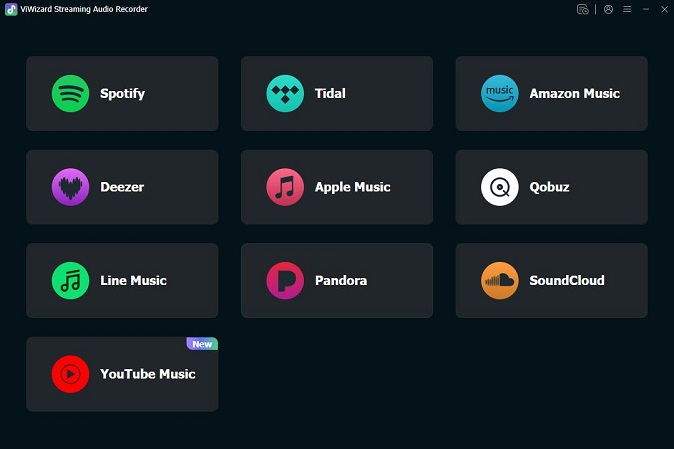
Return to the main interface of ViWizard. You will see 9 supported music logos each with an entrance to the built-in web player inside ViWizard. To access the Deezer music library, click the Deezer icon.
 Step 3: Add the Deezer Songs to Download
Browse or search for the Deezer tracks, playlists, or albums you want to download. Once you've located the page, click the Plus (+) button and then click Add to List to put them in the download queue.
 Step 4: Start Downloading Deezer FLAC Music
Click the Convert button to begin the download process. ViWizard will convert the selected songs from Deezer to FLAC format, keeping the original audio quality, with a speed up to 5x faster speeds. When the process is complete, click the folder icon beside each track to open the local folder where your FLAC files are stored.
Part 3. Other Ways to Download FLAC from Deezer
While using ViWizard Deezer Music Downloader to get FLAC files from Deezer is the most reliable option, you may want to have more options to choose your favorite method. In the following, we'll cover both mobile and desktop users, providing three available methods with step-by-step tutorials.
3.1 Download FLAC from Deezer with Premium Subscription
If you have a Premium membership to Deezer, whether it is a Duo, Family, or Student plan, all members have access to download music for offline listening. However, these downloads are encrypted and not in true FLAC audio format, but you can download music in high fidelity sound quality and listen to it offline. Here's how to do it:
01 Open the Deezer app on mobile (Android, iOS) or desktop (Windows, Mac).
02 Navigate to the tracks, playlists, or albums you want to listen offline.
03
Select FLAC audio quality for the download.
- On your phone: Tap the profile icon > Settings icon > Offline & data > Choose download quality. Of the three options, select High fidelity (HiFi) as the download quality.

- On your computer: Tap the Settings icon in the Now Playing column at the bottom of the user interface and select the High Fidelity option.

04 Tap the download button under the cover.

05 Once downloaded, you can find the downloads in Favorites section of the Deezer app on your phone or in the Downloads section of the Deezer desktop app.
Read More : How to Listen to Deezer Offline on All Devices [2026 Latest]
No. Deezer does not save songs to your hard drive or SD card as standalone, playable .flac files. Instead, it downloads encrypted cache data.
Once your paid Deezer subscription expires, the app will lock your offline library, and you will no longer be able to access any of your downloaded high-fidelity tracks.
3.2 Extract Deezer FLAC Files via GitHub Open-Source ReFreezer
ReFreezer on GitHub allows Deezer Premium accounts to download in FLAC (lossless) format, but for free accounts, the highest download quality is 128 kbps. It functions as a custom API clients that bypass typical download restrictions from Deezer.
The Secret to GitHub Downloaders: What is an ARL Cookie?
An ARL is a specific token generated by your web browser when you log into the web player. You can open your Developer Tools, check the Application or Storage cookie section. And then you'll find the long code named arl.
By injecting this ARL cookie into ReFreezer, the application clones your user session and enables direct communication with the file server.
How to Use ReFreezer on Android to Download FLAC
01 Visit the official ReFreezer GitHub Releases directory and download the latest .apk installation file to your mobile phone.
02 Enable "Install Unknown Apps" in your Android system settings, click the package, and complete the setup.
03 Launch ReFreezer. Enter your standard account credentials or paste your custom Deezer ARL token directly into the configuration prompt.
04 Use the in-app search function to find songs or browse your personal music library.
05 On the playback screen, select FLAC quality and click the Download button next to it.
06 If you're using Android 11 and above, the file will be saved in FLAC format directly to your device's storage.

3.3 Capture Deezer FLAC Audio with Recording Software
If you prefer a more flexible way of saving Deezer FLAC music, you can choose to record Deezer audio in real time and export it to FLAC format. ViWizard Audio Capture is one of the best audio recorders on the market. It is a powerful tool for recording any audio on Windows and Mac computers. Unlike traditional desktop recorders, ViWizard captures high-quality audio from any application and supports 16 audio formats and full ID3 tag output. Besides, you can also edit the captured audio for flexible music cutting.

A multifunctional audio recording tool that captures any sound playing on your computer, including streaming music, live radio, game sounds, background music, and online meetings, with built-in auto-splitting and advanced editing features to save recordings in MP3, WAV, and other formats while maintaining the highest quality and embedding track details.
To record FLAC music on Deezer using ViWizar Audio Capture, follow the steps below:
How to Use ViWizar Audio Capture to Get Deezer FLAC Files
01 Download, install, and launch ViWizard Audio Capture on your computer.
02 Open the Deezer Web Player or the Deezer desktop app on your computer.
03 Open the Recording Source drop-down menu and select your browser or the Deezer application depending on where you are playing your Deezer music.

04 Click on the Format panel in the lower left corner and select the FLAC format.
05 Select the audio quality from Auto, 24-bit, or 16-bit.

06 Start playing the Deezer music you want to play and make sure that the streaming quality is high fidelity quality.
07 In ViWizard, click the Start button to record the complete music.
08 When the music ends, click the Stop button.
09 Click the Save button to download the captured Deezer FLAC audio.

Although ViWizard Audio Capture works well, it isn't entirely free. If you're looking for recording software that maintains high quality while being completely free, check out these 9 streaming audio recording tools.
Read More : 9 Best Streaming Audio Recorders Review in 2026
Part 4. Comparison: Which Deezer to FLAC Method Wins?
This side-by-side comparison breaks down all four Deezer-to-FLAC methods across eight critical metrics to help you make the right choice instantly.
| Evaluation Metrics | Method 1: Professional Deezer Music Downloader | Method 2: Official Premium App | Method 3: GitHub Open-Source | Method 4: Audio Capture |
|---|---|---|---|---|
| Supported Platforms | Windows, macOS | Android, iOS, Windows, macOS | Android | Windows, macOS, Linux |
| Output Audio Quality | True Lossless FLAC (1411kbps) | True Lossless FLAC (1411kbps) | True Lossless FLAC (1411kbps) | Lossless FLAC (Dependent on card) |
| True File Ownership | Yes | No (Encrypted DRM cache) | Yes (Permanent .flac files) | Yes (Permanent .flac files) |
| Download Speed | Up to 46x | Fast official streaming download | Fast direct API extraction | Slow (1x real-time recording) |
| ID3 Tag Preservation | Perfect (Keeps cover art & lyrics) | Perfect (In-app only) | Perfect (Keeps complete metadata) | Perfect (Keeps complete metadata) |
| Ease of Use | Very Easy (One-click UI) | Very Easy (Official toggle) | Medium (Requires ARL cookie extraction) | Medium (Requires manual start/stop) |
| Account Safety Risk | 100% Safe (No ban risk) | 100% Safe (Official method) | Low-Medium (Violates Terms of Service) | 100% Safe (Analog loophole) |
| Long-Term Cost | Paid software (Free trial available) | Continuous paid subscription | 100% Free | Paid software (Free trial available) |
- Get ViWizard (Method 1): Best for saving time. Choose this if you want one-click batch downloads, 46x speed, and automatic ID3 tagging with zero technical setup.
- Stick to Official App (Method 2): Best for mobile-only listeners. Choose this if you just want offline playback inside the official app and do not need to move files to other devices.
- Use GitHub Tools (Method 3): Best for tech-savvy users. Choose this if you know how to extract an ARL cookie and want a 100% free, open-source download setup.
- Use Audio Recorders (Method 4): Best for small clips. Choose this if you only need to record specific song snippets or background audio safely without any API downloads.
If you want to learn more about FLAC downloader tools for streaming music, such as on Deezer, check out this comprehensive review of the 11 best free and paid FLAC downloaders.
Read More : 11 Best Free and Paid FLAC Downloader Tools for Lossless Music
Conclusion
The official Deezer FLAC downloads are very easy to do with a few taps, but are DRM-restricted and can only be played in the Deezer app. To get the actual FLAC files of Deezer songs, you can either use an open source program like ReFreezer or a specialized tool like ViWizard Deezer Music Downloader or ViWizard Capture Audio. Whichever method you choose, once you've saved these downloaded tracks to your local device, you'll be able to keep, play, transfer and organize them. Why don't you start building your own lossless Deezer music library now and give yourself the freedom to enjoy your music wherever and whenever you want.
You May Be Interested


Dave Henry, a multimedia technologist at ViWizard, focuses on delivering the best solutions for digital media challenges, including audio and video conversion, media optimization, and troubleshooting.

Leave a Comment (0)